
Free resources
Templates you can use now.
What every good example has in common
The best examples make orientation, ownership, and signal flow obvious. The audience edge is marked, stage left and right follow the performer's perspective, every performer has a readable label, and numbered monitors agree with the monitor list. Sources that reach the console also appear in the input list under the same names.
Real dimensions are useful when known. If they are estimates, mark them as such. A venue can work with an honest approximation; it cannot plan reliably around a precise-looking measurement that is wrong.
- Artist name, show configuration, revision, and production contact
- Audience edge plus stage-left and stage-right orientation
- Performers, instruments, microphones, DIs, monitors, and backline
- Consistent input and monitor numbering
- A short notes area for substitutions and unusual requirements
Three-piece band stage plot example
A conventional guitar, bass, and drums trio can stay compact without becoming vague. Place the drum kit at the rear, show the guitar and bass positions from the performer’s perspective, and add every vocal mic, amp or DI, wedge, and power drop. If both front-line performers sing, label their microphones and monitor mixes separately.
The input list should still spell out the full drum patch instead of treating the kit as one source. Follow it with bass, guitar, and vocals, using the same names that appear on the plot. A simple lineup can easily exceed ten console inputs once drum microphones and vocals are counted.
Four-piece band stage plot example
For a typical two-guitar, bass, and drums lineup, distinguish the two guitar positions with stage-left and stage-right labels. Show whether each rig uses an amplifier microphone, a direct modeler output, or both. Add vocal positions, pedalboard power, monitor ownership, and any shared backline notes that affect changeover.
If the fourth member plays keys instead of a second guitar, show mono or stereo DI requirements beside the keyboard position and repeat them in the channel list. The venue should not have to infer the signal format from the keyboard symbol alone.
Five-piece band stage plot example and PDF
A typical drums, bass, guitar, keys, and lead-vocal setup needs enough space to show backline relationships and cable destinations. Start with the drum riser or kit, then position the bass and guitar rigs, keyboard station, vocal microphones, and monitor wedges. Use labels such as Guitar SR rather than names that only the band recognizes.
The corresponding input list should group the drum channels, then bass, guitar, keys, playback, and vocals. If the keyboard rig sends stereo outputs, show Keys L and Keys R both on the list and near the keyboard position. The downloadable example demonstrates this cross-check.
Duo and solo-artist examples
A smaller act does not need a crowded page. A vocal-and-guitar duo can show two positions, two vocal microphones, instrument inputs or DIs, two monitor mixes, power, and any artist-supplied pedalboards. A solo artist may need only one clearly labeled position, but playback, laptop, stereo DI, wireless, or talkback details can still make the input list essential.
Keep empty space when it helps the venue read the page. Do not enlarge decorative symbols until the setup looks more complex than it really is. The goal is rapid comprehension during advance and load-in.
Examples for festivals and quick changeovers
Festival documents should highlight what rolls, what is shared, and what must be repatched. Mark riser sizes, wheel or brake requirements, artist-supplied backline, loom destinations, and any equipment that remains powered during changeover. A concise changeover note is often more valuable than another decorative icon.
If several show configurations exist, export a separate, clearly named plot for each. Avoid placing full-band and fly-date alternatives on the same page unless the differences are extremely small.
Review an example before sending it
- Print or preview at actual A4 or Letter size and confirm every label is readable
- Compare every plotted audio source against the input list
- Compare every monitor number against the mix list
- Check that requested and artist-supplied equipment are clearly separated
- Add the revision date and export a filename the venue can identify
Worked example // layout to export
Inspect a complete stage plot, not a decorative mock-up.
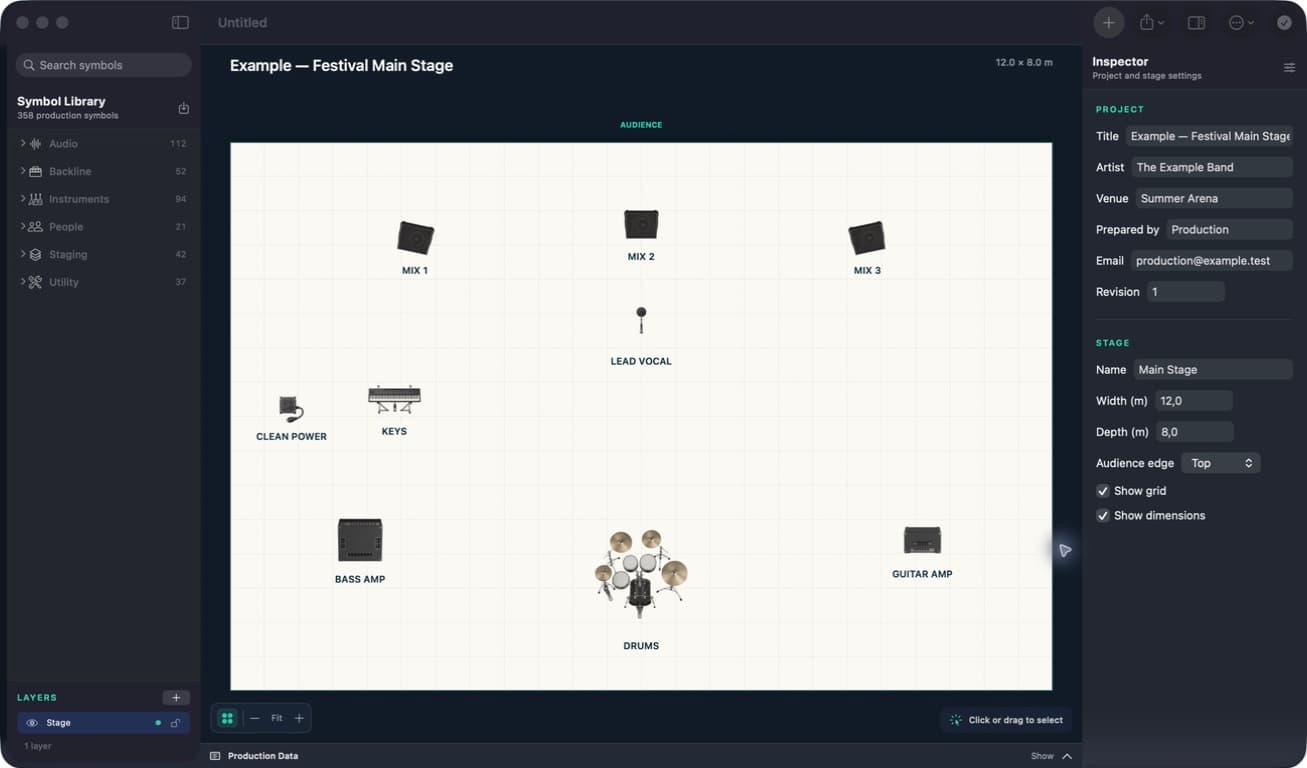
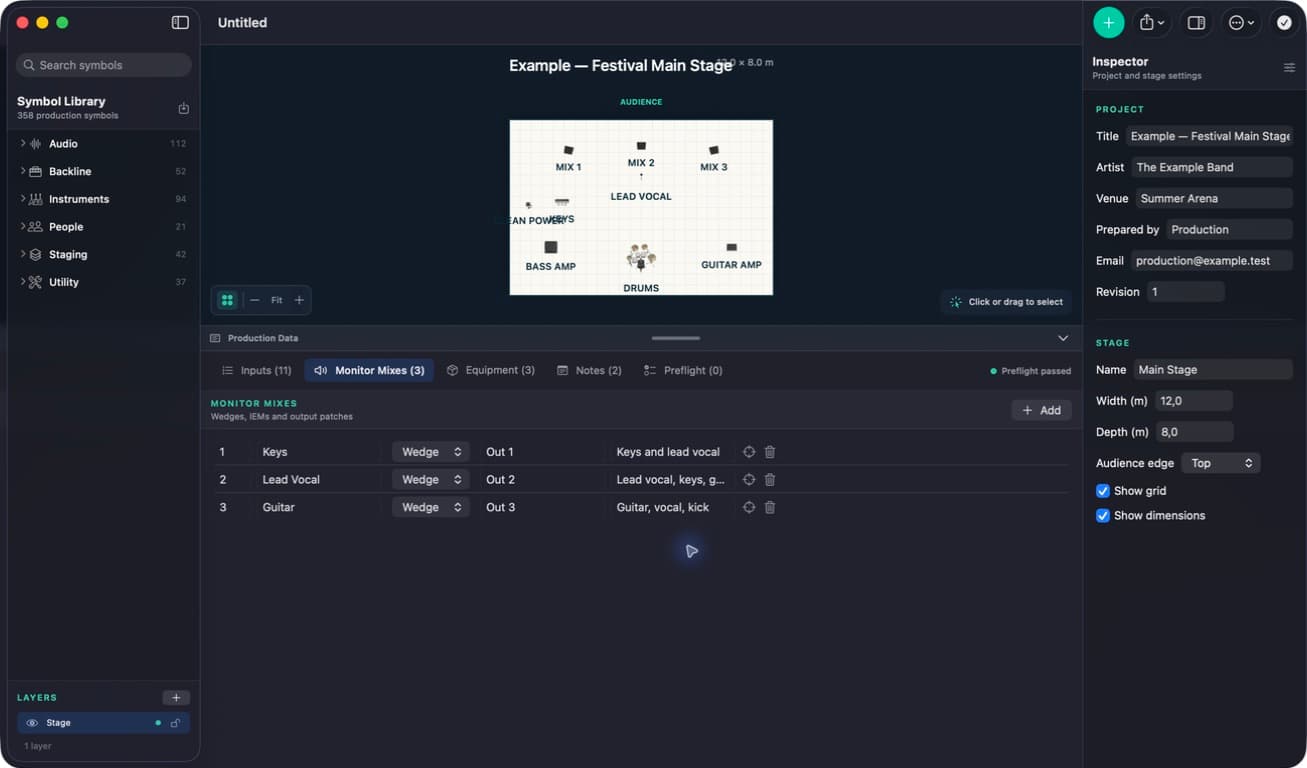
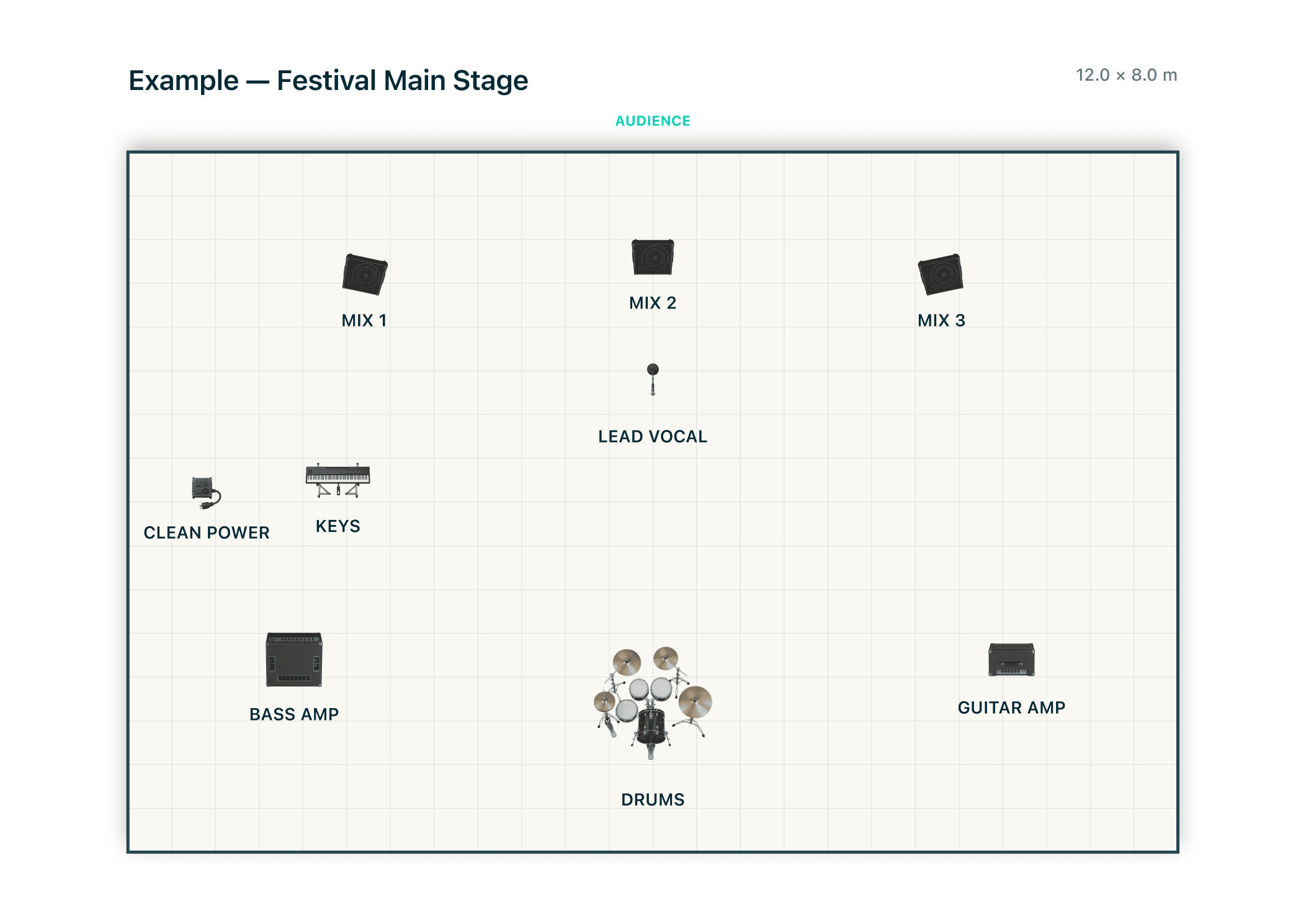
This Festival Main Stage example follows one project from the editable layout through the monitor plan to the final exported page. Open the four-page PDF to cross-check the plot against its inputs, monitor mixes, equipment and production notes.
Build the working document on your computer.
Stage Plot Forge keeps the visual plot, production lists, notes, and exports together in one local project.
Download Stage Plot Forge